

Blue stylized letter M with the words ORDER.PLACE below it on a white background.

Merchant App (MA) for Front-of-House and Managers

A configurable, responsive web app for aggregator control, driver-change requests, locker assignment, and membership operations.

B2B
Front of the house
CMS
My Role
UI/UX Designer · Researcher · HTML & CSS Developer · Liaison with PM, Developers, and Product Lead
Team
PM · Developers · Designers · QA · Product Lead
Timeline
Jun 2019 – Nov 2023
Deliverables
Wireframes · Mockups · Interactive Prototypes · Responsive HTML/CSS · Flow Testing

Experience the app

google play store badgeApp store badge

The Problem

MA needed to centralize daily operations while reducing training time. Aggregator and driver workflows were urgent: staff required direct control in-app instead of relying on Aigens CRM configuration.

User pain points (staff)

  • Hard to quickly toggle aggregators on or off.
  • No simple way to request a driver change.
  • Locker assignment not integrated into the order flow.
  • Couldn’t resend SMS reminders after the initial automatic message.

Business pain points

  • Minimize training; MA must be usable anytime, anywhere, on any device.
  • Reduce reliance on Aigens staff for CRM configuration.
  • Ensure an extensible, future-friendly design.
  • Comply with Foodpanda requirements to capture “unusual closing” reasons.

Research

I worked with the PM to understand store habits and aggregator rules, then mapped what data and timings exist so flows are realistic and auditable.
What I did

  • Spoke with the PM to gather client operational pain points and front-of-house habits.
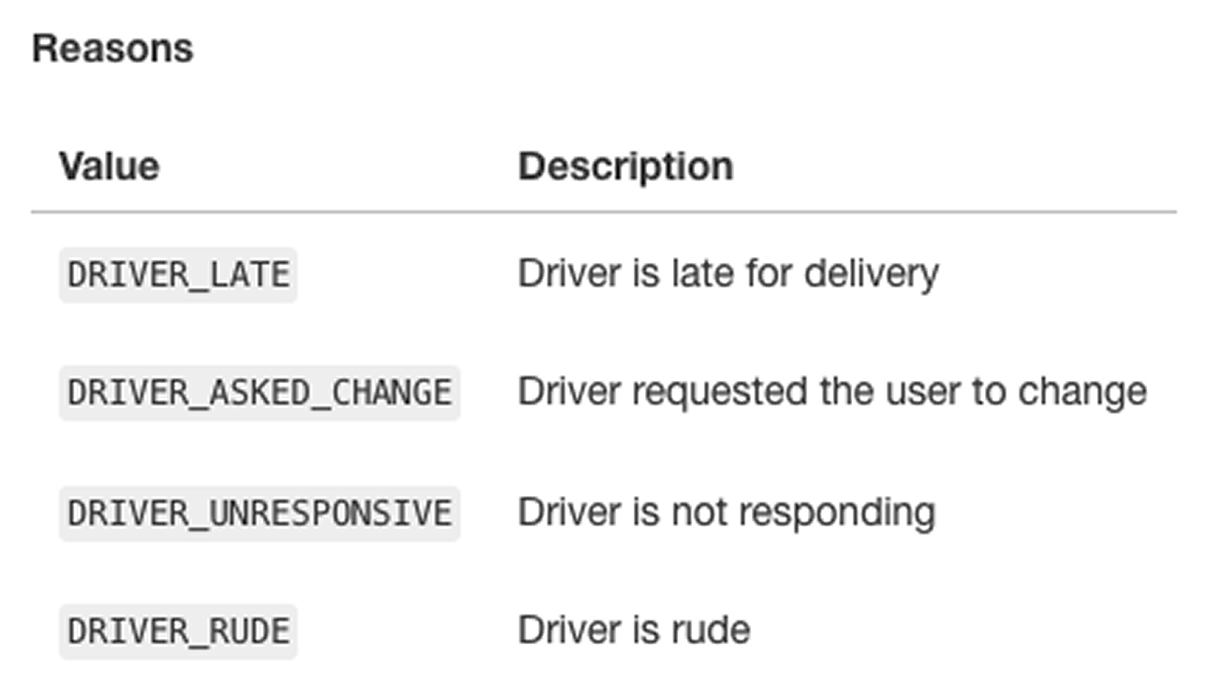
  • Studied Foodpanda’s unusual-closing requirement (reason capture).
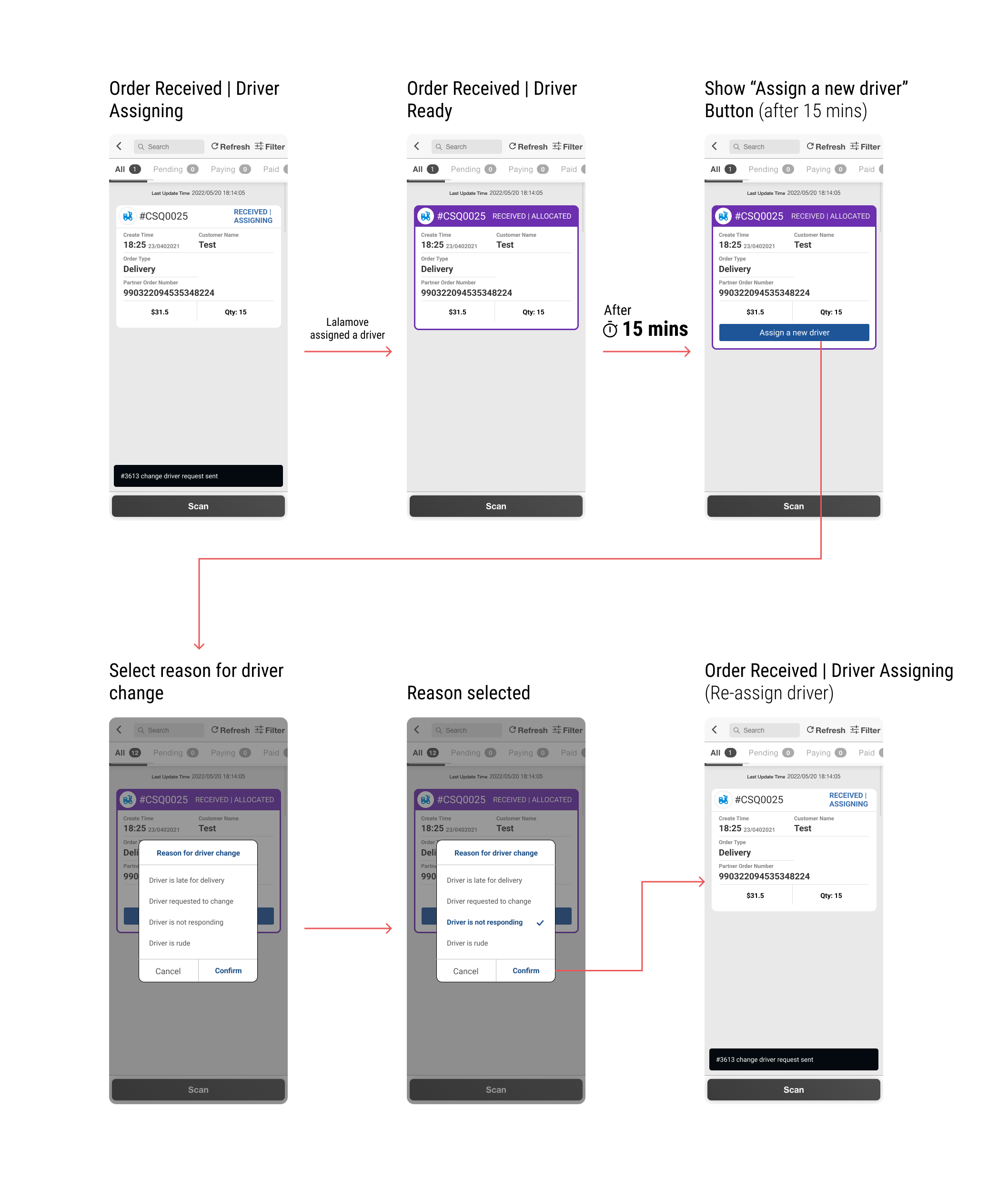
  • Investigated Change Driver triggers (about 15-minute threshold and allowed order states).
  • Confirmed locker-number data availability at the moment of assignment with the backend team.
  • Analyzed when Resend SMS is both operationally useful and technically feasible.

Insights

To scale, MA must feel immediate, responsive, and configurable, not a maze of pages.

Concepts explored

  • In-context Home controls: Place aggregator switches beside Open/Close Store so staff don’t drill into subpages.
  • In-context Order Status controls: Collect driver-change reasons (selectable) and assign locker numbers inline with the order.
  • Responsive by default: The same workflows must work on tablet, mobile, and desktop.
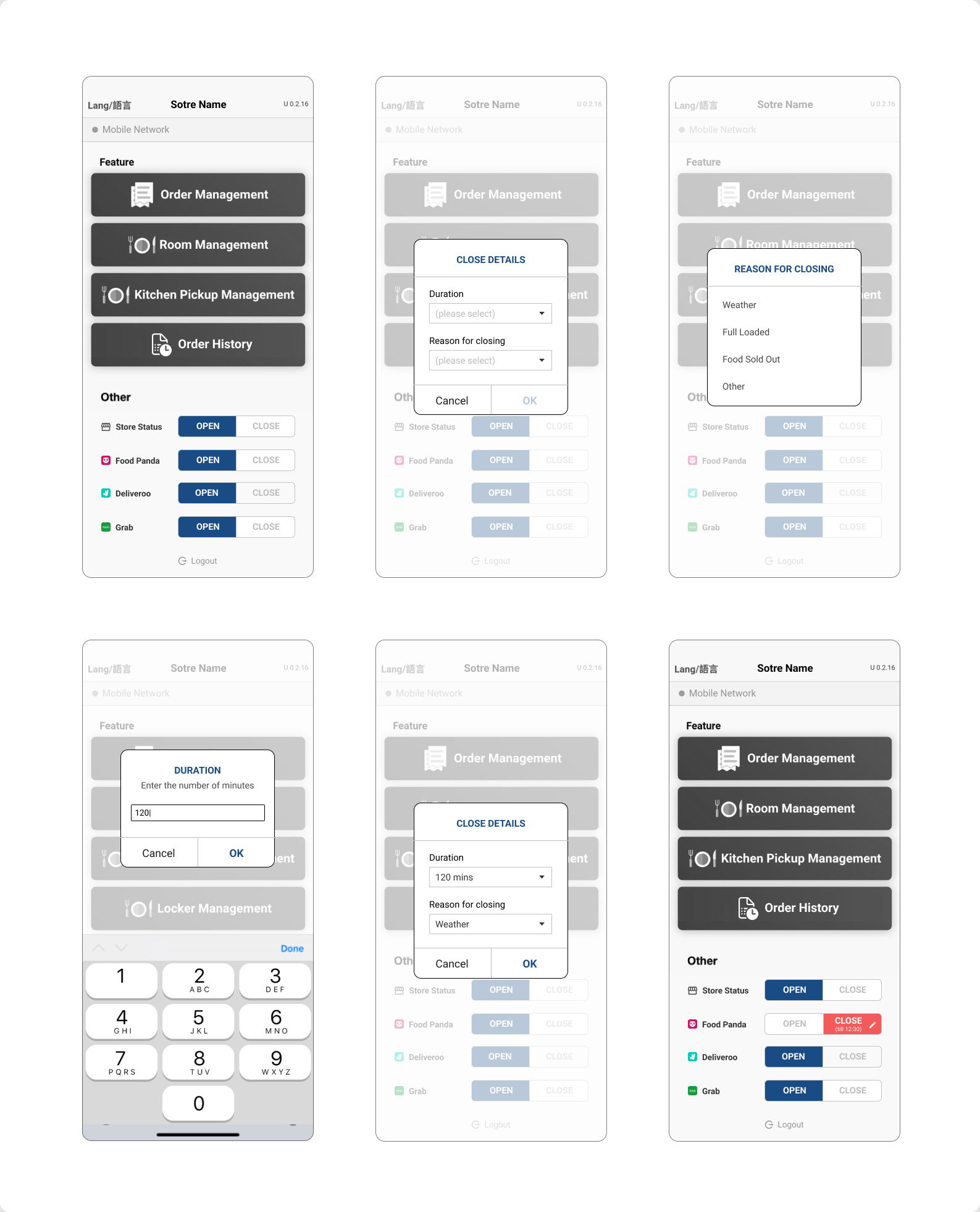
  • Configurable compliance: Capture Foodpanda’s “unusual closing” reasons via a reusable, configurable component.

Ideation

Design direction: keep MA operational, lightweight, and configuration-first. Add power where staff already work.
Concepts explored

  • In-context Home controls: Place aggregator switches beside Open/Close Store to keep actions where staff already work; avoid new pages unless the feature is entirely new.
  • Responsive by default: Implement responsive HTML/CSS so interaction density and controls work on tablet, mobile, and desktop.
  • Configurable compliance: Add a reusable Close store reason component to meet Foodpanda requirements and enable future reuse.
  • Order Status control cluster: Keep actions in one place: Change Driver with preset reasons and inline Locker No. assignment, grouped with the order.
  • Smart notifications: Show Resend SMS only when status/time rules are met (e.g., when the order reaches Ready after an automatic completion timeout).

Early Concepts

I validated flows with the PM, developers, and the Product Lead before committing to visuals, keeping screens aligned with team mental models and backend constraints.
How we iterated

  • Drafted lo-fi wireframes for Home controls, Order Status, and locker assignment.
  • Walked through data constraints (timeouts, status transitions, locker readiness) with engineering.
  • Adjusted micro-copy, button states, and visibility rules based on feasibility.
  • Built clickable prototypes to validate timing and visibility rules.

The Big Idea

A universal, responsive Merchant App that centralizes front-of-house actions and aggregator workflows with minimal clicks, and scales across brands without retraining.

For staff (user ease)

  • Home: Open/Close Store with adjacent aggregator switches.
  • Order Status: Change Driver (preset reasons) and inline Locker No. assignment.
  • Notifications: Resend SMS appears only when valid (automatic completion path).
  • Membership operations: Scan Reward QR and Point Add, protected by Staff ID checks.

For the business (efficiency)

  • Lower training time through predictable placement and patterns.
  • Fewer CRM interventions via in-app configuration points.
  • Scalable modules for new markets, aggregators, and features.
  • Compliance with Foodpanda unusual-closing reasons via a reusable component.

Outcomes

MA now supports day-to-day operations for front of house and managers with clearer control of aggregators, drivers, lockers, and notifications.
User outcome

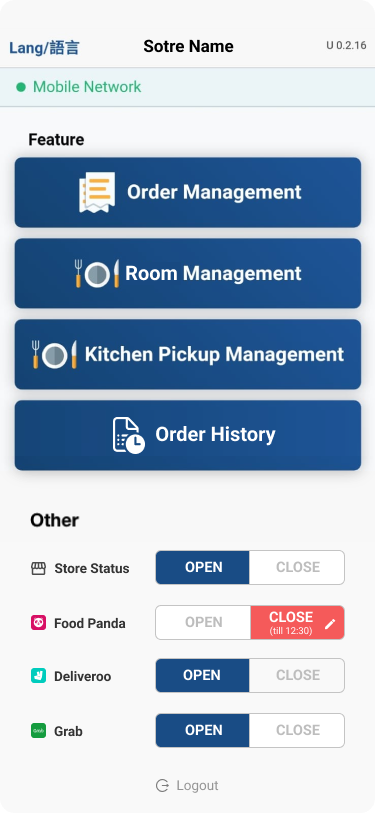
  • Faster access to critical controls on the screens they already use.
  • Less menu hunting, fewer clicks, and clearer states.
  • Sensitive actions gated by Staff ID confirmation.

Business outcome

  • Less training and smoother rollout across devices.
  • Fewer back-and-forth CRM changes; more autonomy in stores.
  • Extensible patterns that support present and future needs (e.g., Foodpanda compliance).

Reflection

Operational UX succeeds when it is realistic, auditable, and easy to teach. That required disciplined scoping and precise communication.

What I learned

  • Understand front of house reality, even indirectly through the PM, before designing screens.
  • Lock down timing rules (automatic completion windows, driver-change thresholds) and data points (locker fields) early.
  • Precise wireframes and feasible mockups save development cycles and launch time.
  • Developers often prefer clear wireframes over abstract process charts.

Future improvements

  • Deeper analytics on Resend SMS outcomes.
  • Inline guidance for rare flows (for example, unusual closing).
  • Batch actions for multi-order locker assignment.